Running a mobile coffee business means the best part of the job is also the hardest part to explain: the trailer is somewhere different almost every day. One morning we are pouring at a farmers market, the next we are at a school, a gym, a farm in Burgaw, or a neighborhood lakehouse. People find us once, fall in love with a drink, and then ask the same question at the window: how do I find you again?
For a long time my honest answer was "check Instagram," which works until a post gets buried. So I fixed it for good. Common Tides now has a live map that always knows where the trailer will be, and it lives at one easy address: find.commontides.com.
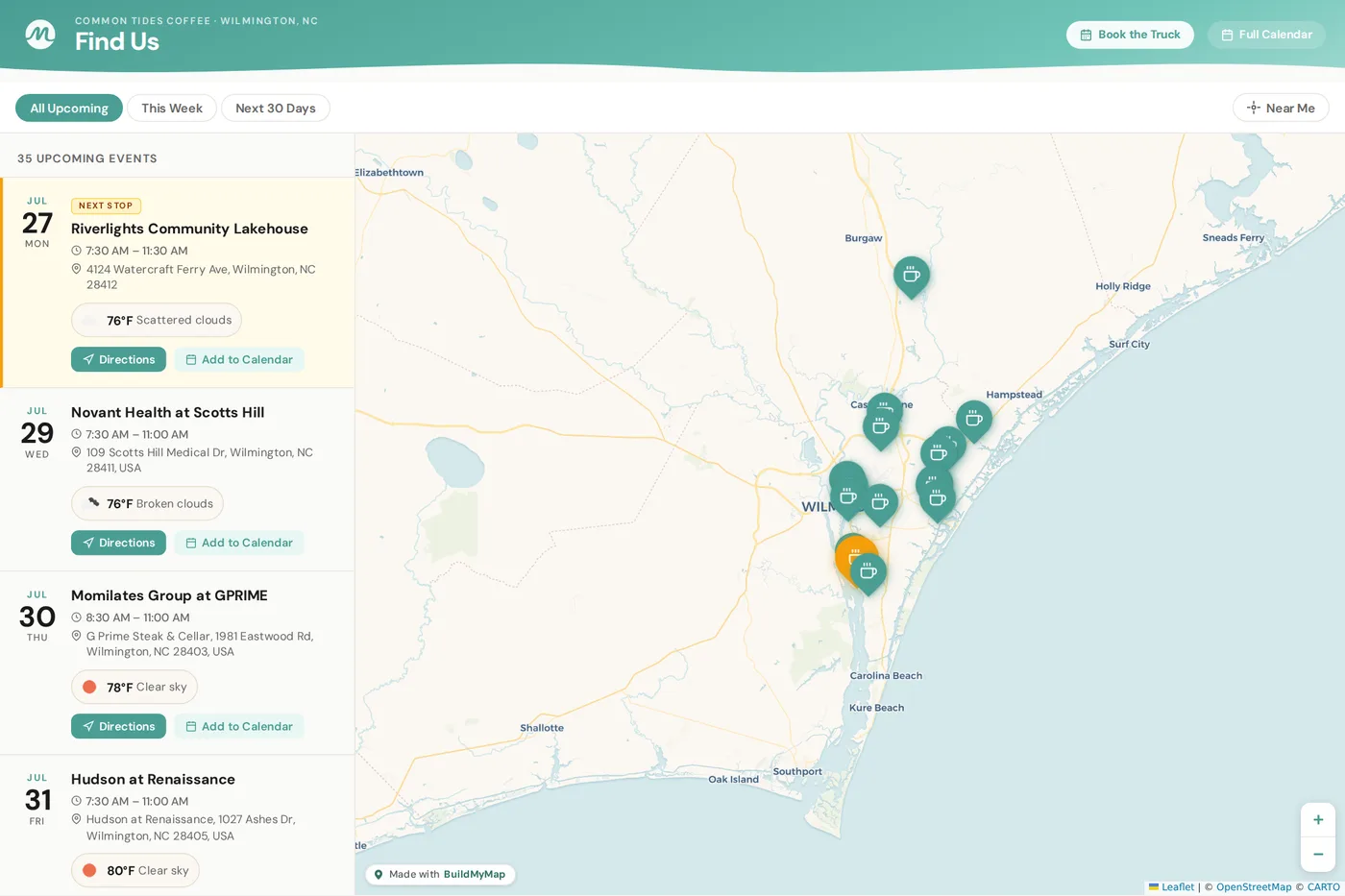
The live map at find.commontides.com. Every pin is an upcoming stop, and the next one is highlighted in gold.
One Link That Always Knows Where We Are
Open the map and you see every upcoming public stop across Wilmington and the Cape Fear coast, each one pinned exactly where the trailer will park. The very next stop glows gold so you can spot it in a second. Tap any stop and you get the full picture:
- Date, time, and address for every stop, pulled straight from our real schedule
- A Directions button that opens turn by turn navigation right to the trailer
- Add to Calendar so your phone reminds you before we roll in
- The weather forecast for stops coming up in the next few days
- A Near Me button that sorts every stop by distance from where you are standing
Filters across the top let you look at everything upcoming, just this week, or the next 30 days. No scrolling a feed, no guessing. If it is on the map, the trailer will be there.
Put the Trailer on Your Home Screen
Here is the part most people do not know: you can save the map to your phone so it works like an app. One tap from your home screen and you are looking at our live schedule. It takes about ten seconds:
On iPhone
Open find.commontides.com in Safari. Tap the Share button at the bottom, scroll down, and tap Add to Home Screen. Done. The Common Tides icon now lives on your phone.
On Android
Open find.commontides.com in Chrome. Tap the three dot menu in the top corner and choose Add to Home Screen. That is it. One tap access from now on.
Once it is saved, finding the trailer is faster than finding a text message. Tap the icon, see the gold pin, hit Directions, and come get your latte. If you have ever driven past us somewhere and thought "I need to remember where that truck goes," this is how you remember.
"People find us once and ask how to find us again. Now the answer fits on their home screen."
The Secret: The Map Runs Itself
Here is what makes this work for a one person business. I do not update that map. Ever. The map is connected to the same Google Calendar I already use to run Common Tides. When I book a new stop, I add it to my calendar with the location, and the pin shows up on the map on its own. If a time changes, the map changes with it. If an event is a private booking, it simply never appears, because the map only shows stops with a public location.
That automation comes from a service called BuildMyMap, and it is the reason a solo operator like me can offer a live tracking map that feels like something a big chain would build. BuildMyMap took the schedule I was already keeping and turned it into the map you see at find.commontides.com. It builds the whole page, keeps it synced with my calendar, and hosts it for me on our own web address. Our customers see a Common Tides page through and through, with our logo and our colors, at a Common Tides link.
Not Just for Coffee Trucks
I get asked about the map by other vendors almost as often as customers ask about the schedule, so here is the plain answer for the business owners reading this. BuildMyMap is not a coffee thing. It works for any business that pops up around town and needs customers to know where it will be:
- Food trucks and trailers of every kind
- Mobile boutiques and pop-up shops
- Farmers market and craft market vendors
- Mobile bars, dessert carts, and shaved ice stands
- Anyone whose answer to "where are you located" starts with "well, it depends on the day"
The process is simple on purpose. You connect the Google Calendar you already keep, and your schedule becomes a live map. From there you can embed the map right into your existing website, share it as its own page, or do what I did and put it on your own web address so the whole thing feels like yours. If you already put your stops on a calendar, you are most of the way there before you start.
BuildMyMap
A live location map for food trucks, coffee trailers, and pop-up businesses of all kinds. Connect your Google Calendar and your schedule becomes a real time map your customers can follow, embed it on your site or host it on your own web address. See live examples and get started at buildmymap.com.
Never Miss the Trailer Again
Every week I meet someone at the window who says they have been trying to catch us for a month. I love hearing it and I hate hearing it at the same time, because the chase is over if you want it to be. Save find.commontides.com to your home screen today, and the next time you want a latte, the gold pin will tell you exactly where to find one.
The short version: our live map at find.commontides.com shows every upcoming Common Tides stop with times, directions, and weather. Save it to your phone home screen for one tap access. The map is powered by BuildMyMap, a service any pop-up business can use to turn a Google Calendar into a live location map at buildmymap.com.